


April 10th/11th

Updated: Apr 11, 2023

1. MyAlbum.com
Head over to your MyAlbum and add the following items:
Self Portrait Project
Book Levitation Photos
Paper Airplane Photos
Liquify Name Edit
Personal Collage
Light Painting
Outline Sketch
Ripped Paper Spirit Animal
Women's History Edit
Alphabet Photography Edit
NAHS Logo
Dispersion Edit
CSUN Garden Photographs
Alphabet Photography of your name (CSUN Walk)
2. Self Portrait Project Presentations/Extra Credit
You can present your self portrait for 10 extra credit points. This is optional! If you choose to present please answer the following questions during your presentation:
Where did you shoot your portrait?
What challenges did you face?
What does the portrait tell us about you?
What are you proud of about your portrait?
If you did this project again, what would you do differently?
3. AI Photography Generator in Pixlr
Watch this video on the future of photography as it's influenced by AI.
Head to Pixlr X.
On the left hand side choose AI Generator.

In the search bar, type in key words. For example: an armoured siberian tiger, oil painting, anime, highly detailed, low angle show
Type in three different prompts, or search terms. Save the images they generate, and submit to Schoology under "AI Generated Images," and include your prompt in the assignment.
You can also check out https://www.fotor.com/features/ai-image-generator/
It's more accurate, however, there is a limit to free images.


4. NAHS Brochure Assignment- Due April 28th
Go to Groups in Schoology. Join the group "NAHS Brochure Photographs" by using the access code: 2D8K-T284-MGFD2
Add photos you have taken in this class, AS WELL AS photos you have of your everyday life at NAHS and at school activities.
Step 1: Head over to CANVA. Sign in with your school email
Step 2: In the search bar, type in "brochure."

Step 3: Choose a template. Consider the fact that you can change the color template of any template to match our school colors by clicking here.
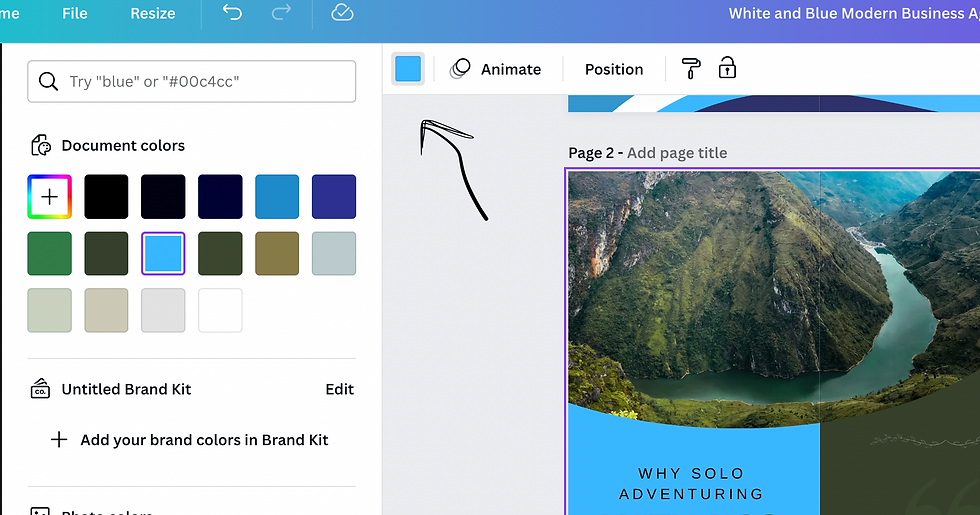
Step 4: Design The Cover
The cover is the farthest panel on the right. (Circled in the image below.)
The cover should include:
Northridge Academy High School (not abbreviated to NAHS)
A logo that you have created
Our logo- "Inspire And Achieve"
At least one image that represents students and life at NAHS. You can use the photos from the NAHS Brochure group albums in Schoology, or a photo that you took yourself.

Step 5:
SAVE your work in CANVA! We are NOT done.

Comments